Free interior quotation template
Stop fixing broken totals in last month’s quotation. Fill this interior quotation template in online and save a clean PDF, or download it for Excel or Word. The amounts, GST or VAT, payment stages and amount in words are worked out for you.
 By Sajeesh V S, founder of Qrenzy. Updated
. No sign-up, nothing uploaded.
Fill in your interior quotation
Add rooms and items with your own rates. The summary updates as you type. When it looks right, choose Preview and save as PDF.
Download the interior quotation format
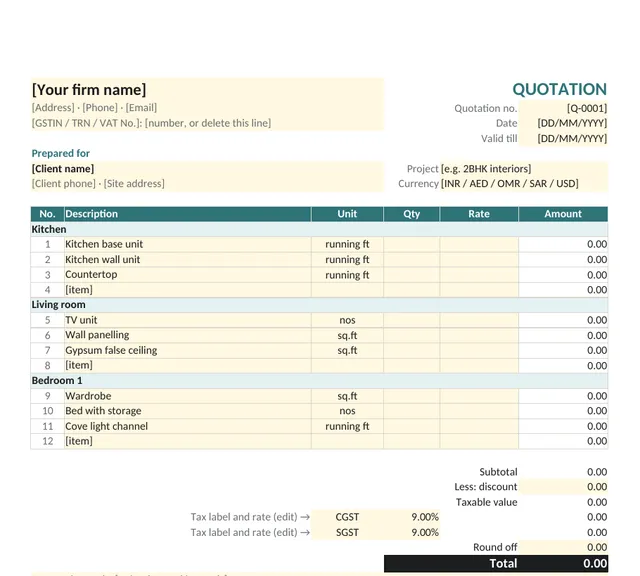
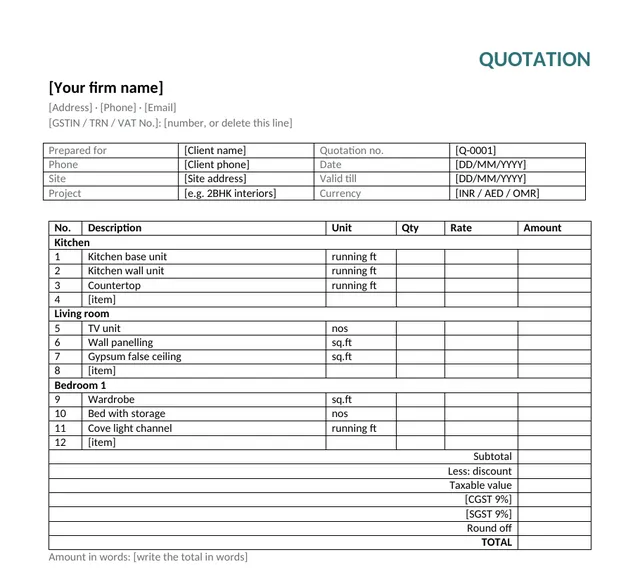
Both files are laid out for A4, with rooms for Kitchen, Living room and Bedroom, common items and their units already filled in. Rates are left blank on purpose: they are yours.
- Interior quotation template for Excel (.xlsx)
- Type quantities and rates in the yellow cells; amounts, tax, total and payment stages are formulas. Opens in Excel and Google Sheets.
- Interior quotation template for Word (.docx)
- The same A4 layout as a Word table, for firms that prefer typing every figure. Opens in Word, Google Docs and LibreOffice.
What an interior quotation should include
A client compares your quotation with two or three others, often on a phone. The ones that win are the ones that leave nothing to ask. Check yours has these, in this order:
- Your firm’s details: name, logo, address, phone, and your GSTIN, TRN or VAT number if you are registered.
- Client and site: the client’s name and phone, and the site address, so the quotation is clearly for this job.
- Quotation number, date and valid-till date: rates for board, hardware and labour change, and a validity date protects you.
- Work grouped by room: Kitchen, Living room, Bedroom 1. Clients read room by room, and it is the easiest way for them to cut scope without asking you to redo the whole quotation.
- For each item, a quantity, unit, rate and amount: with a short line under it for material and finish, such as BWP plywood, acrylic shutters.
- Subtotal, discount and tax: show tax on the value after discount, with each tax on its own line (CGST and SGST, IGST, or VAT).
- The total in figures and in words.
- Payment stages: each stage as a percentage and an amount, adding up to the total exactly.
- Terms: what is not included (electrical, plumbing and civil work are the usual surprises), validity, warranty and timelines.
- Bank details and a signature line.
Which unit to use for which interior item
Using the unit your client expects makes rates easy to compare. These are the units most interior firms in India and the Gulf quote in; use metres instead of feet if that is how you work.
| Item | Usual unit | How it is measured |
|---|---|---|
| Kitchen base and wall units, countertops | running ft (rft) | Length along the wall |
| Wardrobes, TV units with panelling, wall panelling | sq.ft | Width × height of the front |
| False ceiling, flooring, wallpaper | sq.ft | Length × width of the area |
| Cove light channels, skirting, profiles | running ft | Total length |
| Beds, dressing tables, loose furniture | nos | Count |
| Work priced as a whole, such as a pooja unit | lot or lump sum | One item for the agreed scope |
From building this template: three mistakes we saw
We built Interior Quote by rebuilding a real interior firm’s quotation line by line and checking every figure against the original. Three things go wrong most often in spreadsheet quotations, and the template handles each of them:
- Payment stages that are a paisa off. 40% of a total that does not divide evenly leaves a remainder. The template gives that remainder to the last stage, so the stages always add up to the total.
- Tax worked out before the discount. Tax belongs on the value after discount. The template applies it there, line by line.
- Amount in words typed by hand. It is the line clients read most and the one most often left wrong after a revision. The online template writes it from the total, in lakh and crore for rupees.
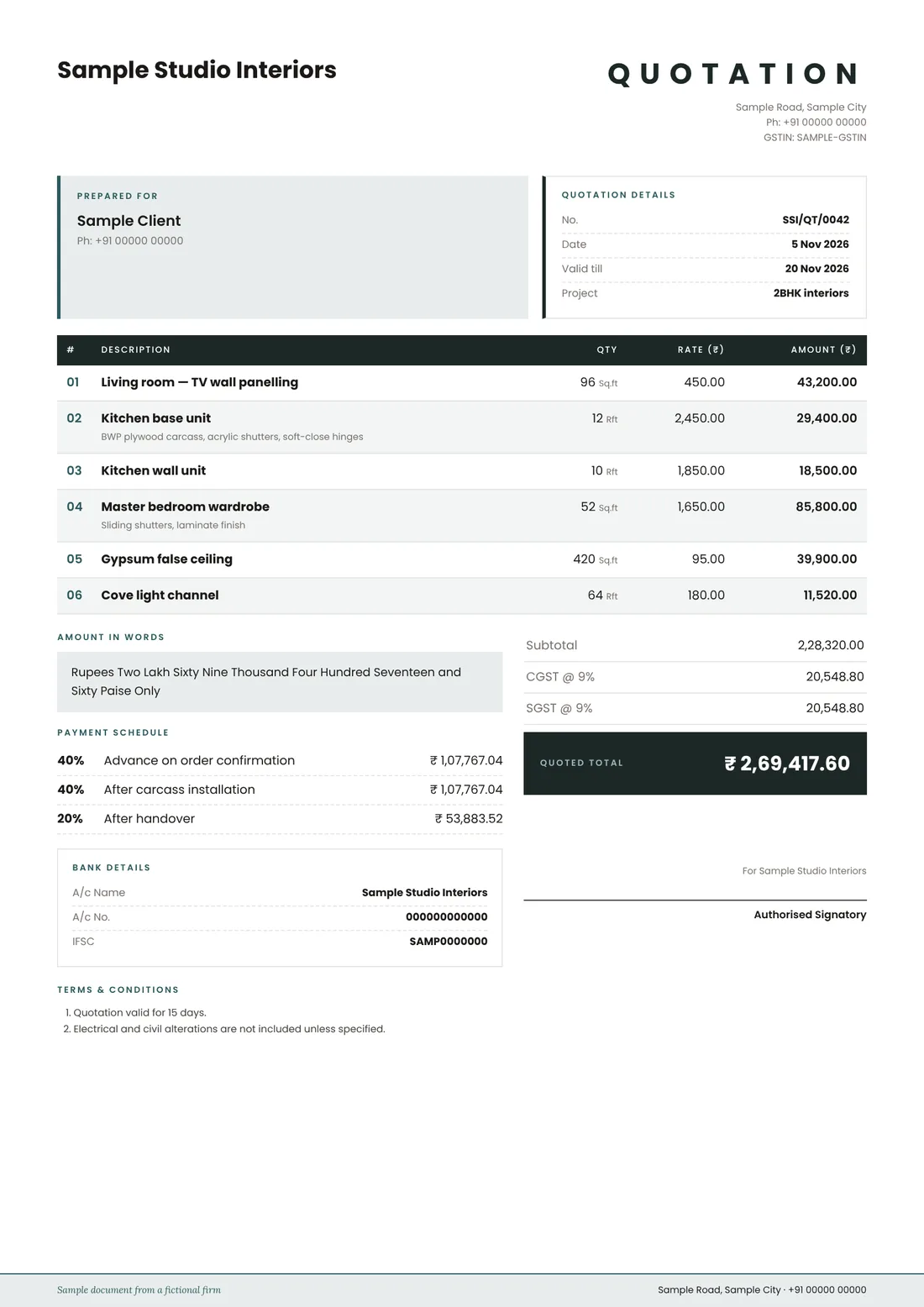
Sample interior quotation
This is what the finished document looks like, made with Interior Quote for a fictional firm.
When the template is enough, and when it is not
The template is right for one quotation. If you send quotations every week, the Interior Quote app saves your rates and tells you what your client did with the quotation.
| Free template | Interior Quote app | |
|---|---|---|
| Room-wise items, tax, stages, amount in words | Yes | Yes |
| Yes | Yes | |
| Your rates saved in an item library | No | Yes |
| Quotations saved, numbered and searchable | No | Yes |
| Send as a WhatsApp link; see when it was opened | No | Yes |
| Client accepts or asks for changes from the link | No | Yes |
| Revisions kept as sent | No | Yes |
| Price | Free | Free during the pilot |
Interior quotation template questions
Is this interior quotation template really free?
Yes. You can fill it in online and save it as a PDF, or download the Excel and Word versions, without signing up or paying. The only mark on your quotation is a small line at the foot saying it was made with this template.
Which is better, the Excel or the Word template?
Use Excel if you want the sums done for you: each line’s amount, the subtotal, two tax rows, the total and the payment stages are formulas, so you only type quantities and rates. Use Word if you prefer to type every figure yourself. The online version does everything Excel does and also writes the amount in words.
How do I add GST to an interior quotation?
Pick GST 18% (CGST 9% + SGST 9%) for work within your state or IGST 18% for another state, and put your GSTIN in the Tax ID field. The template works out each tax on the value after discount. Confirm the rate that applies to your work with your chartered accountant.
Does it work for VAT in the UAE, Oman or Saudi Arabia?
Yes. Choose your currency (AED, OMR, SAR and others) and VAT 5%, 10% or 15%. Omani rial amounts are calculated to three decimals, to the baisa. Put your TRN or VAT number in the Tax ID field.
Do you save what I type?
No. The online template runs in your browser and nothing is sent to us. An unfinished draft is kept only in this browser so you do not lose it if you close the tab; Clear the form deletes it.
How do I send the quotation to my client on WhatsApp?
Save it as a PDF and attach it in WhatsApp. If you want to know when your client opened it and let them accept it with one tap, use the Interior Quote app instead: it sends the quotation as a link.